# Deleting a Contact with AdonisJS and Vuejs
**Author:** Ndianabasi Udonkang
**Published:** 2021-12-20
In this lesson, you will learn how to implement a button for handling deletion of a contact.
---
## Tags
- [JavaScript](/llms/technical-blog/tag/javascript.md)
- [Vuejs](/llms/technical-blog/tag/vuejs.md)
- [Full Stack](/llms/technical-blog/tag/full-stack-1.md)
- [Adonisjs](/llms/technical-blog/tag/adonisjs.md)
- [Quasar Framework](/llms/technical-blog/tag/quasar-framework.md)
## Part of Series: [Full-Stack Google Contacts Clone with Node.js (Adonisjs Framework) and Vue.js (Quasar Framework)](/llms/technical-blog/series/clnwu9bc991hiu3wo2vwmw45/full-stack-google-contacts-clone-with-node-js-adonisjs-framework-and-vue-js-quasar-framework.md)
This article is part of the **[Full-Stack Google Contacts Clone with Node.js (Adonisjs Framework) and Vue.js (Quasar Framework)](/llms/technical-blog/series/clnwu9bc991hiu3wo2vwmw45/full-stack-google-contacts-clone-with-node-js-adonisjs-framework-and-vue-js-quasar-framework.md)** series.
### Articles in this Series:
- [Introduction to Full-Stack Google Contacts Clone with Node.js (Adonisjs Framework) and Vuejs (Quasar Framework)](/llms/technical-blog/article/xe5mlxg43s9rpx1pxsvfdp3r/introduction-to-full-stack-google-contacts-clone-with-node-js-adonisjs-framework-and-vuejs-quasar-framework.md)
- [Workspace Setup | Full-Stack Google Contacts Clone with Adonis.js/Node.js and Quasar (Vue.js)](/llms/technical-blog/article/fo8str8yjpkz5dygxg875bpw/workspace-setup-full-stack-google-contacts-clone-with-adonis-js-node-js-and-quasar-vue-js.md)
- [Frontend Overview | Full-Stack Google Contacts Clone with Adonis.js/Node.js and Quasar (Vue.js)](/llms/technical-blog/article/nxgmng6fhf1cwjk30coflro2/frontend-overview-full-stack-google-contacts-clone-with-adonis-js-node-js-and-quasar-vue-js.md)
- [The Left Drawer | Full-Stack Google Contacts Clone with Adonis.js/Node.js and Quasar (Vue.js)](/llms/technical-blog/article/m6fagvy2il5h65llxxbbl9os/the-left-drawer-full-stack-google-contacts-clone-with-adonis-js-node-js-and-quasar-vue-js.md)
- [Improve The Header | Full-Stack Google Contacts Clone with Adonis.js/Node.js and Quasar (Vue.js)](/llms/technical-blog/article/jjwbxcg450jmkkcrrmkmwvwj/improve-the-header-full-stack-google-contacts-clone-with-adonis-js-node-js-and-quasar-vue-js.md)
- [New Contact Form Design | Full-Stack Google Contacts Clone with Adonis.js/Node.js and Quasar (Vue.js)](/llms/technical-blog/article/ebguwpkntk3empakunrki4dq/new-contact-form-design-full-stack-google-contacts-clone-with-adonis-js-node-js-and-quasar-vue-js.md)
- [Validating the Contact Form with Vuelidate | Full-Stack Google Contacts Clone with Adonis.js/Node.js and Quasar (Vue.js)](/llms/technical-blog/article/z0xr9m2ljler2cwnpsw2ycwa/validating-the-contact-form-with-vuelidate-full-stack-google-contacts-clone-with-adonis-js-node-js-and-quasar-vue-js.md)
- [Designing the Contacts Table | Full-Stack Google Contacts Clone with Adonis.js/Node.js and Quasar (Vue.js)](/llms/technical-blog/article/h2p1x1z406ib38zu2dci3jur/designing-the-contacts-table-full-stack-google-contacts-clone-with-adonis-js-node-js-and-quasar-vue-js.md)
- [Designing the Contacts Table (Part 2) | Full-Stack Google Contacts Clone with Adonis.js/Node.js and Quasar (Vue.js)](/llms/technical-blog/article/j0iscua9gg8ekuz8ifh6chpn/designing-the-contacts-table-part-2-full-stack-google-contacts-clone-with-adonis-js-node-js-and-quasar-vue-js.md)
- [Refactoring the Main Layout | Full-Stack Google Contacts Clone with Adonis.js/Node.js and Quasar (Vue.js)](/llms/technical-blog/article/uktmlqsivwtr3cvnpld59k9q/refactoring-the-main-layout-full-stack-google-contacts-clone-with-adonis-js-node-js-and-quasar-vue-js.md)
- [Improving User Experience with the Contacts Table | Full-Stack Google Contacts Clone with Adonis.js/Node.js and Quasar (Vue.js)](/llms/technical-blog/article/dzs812auf61ej7qu2cg726dh/improving-user-experience-with-the-contacts-table-full-stack-google-contacts-clone-with-adonis-js-node-js-and-quasar-vue-js.md)
- [Designing the Contact Details Page | Full-Stack Google Contacts Clone with Adonis.js/Node.js and Quasar (Vue.js)](/llms/technical-blog/article/kf9pz97n63fvgfrcy5viwzrg/designing-the-contact-details-page-full-stack-google-contacts-clone-with-adonis-js-node-js-and-quasar-vue-js.md)
- [Creating the Contact Edit Page | Full-Stack Google Contacts Clone with Adonis.js/Node.js and Quasar (Vue.js)](/llms/technical-blog/article/fmr90prj84c9zn0633jc368g/creating-the-contact-edit-page-full-stack-google-contacts-clone-with-adonis-js-node-js-and-quasar-vue-js.md)
- [How Software Backends Work | Full-Stack Google Contacts Clone with AdonisJs (Node.js) and Quasar Framework (Vue.js)](/llms/technical-blog/article/aca8fcrghz70nn1wqg3uzbum/how-software-backends-work-full-stack-google-contacts-clone-with-adonis-js-node-js-and-quasar-framework-vue-js.md)
- [Setting Up The Backend | Full-Stack Google Contacts Clone with AdonisJs (Node.js) and Quasar Framework (Vue.js)](/llms/technical-blog/article/fxb49fmz9ljbwrimbnnzudfv/setting-up-the-backend-full-stack-google-contacts-clone-with-adonis-js-node-js-and-quasar-framework-vue-js.md)
- [Why Choose the AdonisJs Framework? | Full-Stack Google Contacts Clone with AdonisJs (Node.js) and Quasar Framework (Vue.js)](/llms/technical-blog/article/lnhm5oudx34yo2869gmcms37/why-choose-the-adonis-js-framework-full-stack-google-contacts-clone-with-adonis-js-node-js-and-quasar-framework-vue-js.md)
- [Setting Up Our API Server with AdonisJs Framework | Full-Stack Google Contacts Clone with AdonisJs (Node.js) and Quasar Framework (Vue.js)](/llms/technical-blog/article/x1jgmet84aqj9qggu5mulkh0/setting-up-our-api-server-with-adonis-js-framework-full-stack-google-contacts-clone-with-adonis-js-node-js-and-quasar-framework-vue-js.md)
- [Setting Up Postman with the API Server | Full-Stack Google Contacts Clone with AdonisJS (Node.js) and Quasar Framework (Vue.js)](/llms/technical-blog/article/v4qehksislosmuy92qgjr4ct/setting-up-postman-with-the-api-server-full-stack-google-contacts-clone-with-adonis-js-node-js-and-quasar-framework-vue-js.md)
- [The Model-View-Controller Design Pattern in AdonisJS | Full-Stack Google Contacts Clone with AdonisJS (Node.js) and Quasar Framework (Vue.js)](/llms/technical-blog/article/h5wqql65iejop5xrplujw458/the-model-view-controller-design-pattern-in-adonis-js-full-stack-google-contacts-clone-with-adonis-js-node-js-and-quasar-framework-vue-js.md)
- [Create Column Definitions & Insert New Contacts | Full-Stack Google Contacts Clone with AdonisJS (Node.js) and Quasar Framework (Vue.js)](/llms/technical-blog/article/asc2emsho4u73r6jb2gxjddw/create-column-definitions-and-insert-new-contacts-full-stack-google-contacts-clone-with-adonis-js-node-js-and-quasar-framework-vue-js.md)
- [Data Validation & Sanitisation with AdonisJS | Full-Stack Google Contacts Clone with AdonisJS (Node.js) and Quasar Framework (Vue.js)](/llms/technical-blog/article/bcey0ac7m5sbs9hqy1h824sl/data-validation-and-sanitisation-with-adonis-js-full-stack-google-contacts-clone-with-adonis-js-node-js-and-quasar-framework-vue-js.md)
- [Creating a Middleware and Updating a Contact | Full-Stack Google Contacts Clone with AdonisJS (Node.js) and Quasar Framework (Vue.js)](/llms/technical-blog/article/oqxzmtgfy1r3oewpnedc7wf6/creating-a-middleware-and-updating-a-contact-full-stack-google-contacts-clone-with-adonis-js-node-js-and-quasar-framework-vue-js.md)
- [Fetching and Deleting a Contact with AdonisJS | Full-Stack Google Contacts Clone with AdonisJS Framework (Node.js) and Quasar Framework (Vue.js)](/llms/technical-blog/article/p6bh0ponq43u3vi6o8uww84x/fetching-and-deleting-a-contact-with-adonis-js-full-stack-google-contacts-clone-with-adonis-js-framework-node-js-and-quasar-framework-vue-js.md)
- [Using Model Factories and Seeders in AdonisJS | Full-Stack Google Contacts Clone with AdonisJS Framework (Node.js) and Quasar Framework (Vue.js)](/llms/technical-blog/article/cfotveuxbgjtdp12l6pzcb2y/using-model-factories-and-seeders-in-adonis-js-full-stack-google-contacts-clone-with-adonis-js-framework-node-js-and-quasar-framework-vue-js.md)
- [Creating and Registering a Vuex Module | Full-Stack Google Contacts Clone with AdonisJS Framework (Node.js) and Quasar Framework (Vue.js)](/llms/technical-blog/article/cw96ewnzujgsz2e2garhbuzb/creating-and-registering-a-vuex-module-full-stack-google-contacts-clone-with-adonis-js-framework-node-js-and-quasar-framework-vue-js.md)
- [Connecting UI Components to the Vuex Store | Full-Stack Google Contacts Clone with AdonisJS Framework (Node.js) and Quasar Framework (Vue.js)](/llms/technical-blog/article/fdyqp17yehbnqrjvjvab4b5b/connecting-ui-components-to-the-vuex-store-full-stack-google-contacts-clone-with-adonis-js-framework-node-js-and-quasar-framework-vue-js.md)
- [Connecting the Frontend to the API Server | Full-Stack Google Contacts Clone with AdonisJS Framework (Node.js) and Quasar Framework (Vue.js)](/llms/technical-blog/article/fk4262359gg3g7f0jn95fn9b/connecting-the-frontend-to-the-api-server-full-stack-google-contacts-clone-with-adonis-js-framework-node-js-and-quasar-framework-vue-js.md)
- [Creating and Updating Contacts From the Frontend | Full-Stack Google Contacts Clone with AdonisJS Framework (Node.js) and Quasar Framework (Vue.js)](/llms/technical-blog/article/t15w2s3ao9jo74l96stjo7z6/creating-and-updating-contacts-from-the-frontend-full-stack-google-contacts-clone-with-adonis-js-framework-node-js-and-quasar-framework-vue-js.md)
- [Uploading Files and Creating Avatars for Contacts With AdonisJS and Axios](/llms/technical-blog/article/hg9ilaubqesm8angg0rhrjp9/uploading-files-and-creating-avatars-for-contacts-with-adonis-js-and-axios.md)
- **Deleting a Contact with AdonisJS and Vuejs** (Current Article)
---
## Article Content
In this lesson, we will learn how to delete a contact from the database. We will add a `delete` button to the `Contact View` page and setup the button to dispatch an API request to the backend when clicked, which will result in the contact being deleted.
Fortunately 😉 or unfortunately 😩, this will be the last lesson for this series. It has been a long ride which has resulted in me creating one of longest web development series on the internet (and I never set out to write such a long series). There will be more advanced topic which will be derived from this projects in the nearest future.
Let's create a new branch of our project:
```bash
# Make sure you are within your project
git checkout -b 21-deleting-a-contact
```
### Frontend Modifications
Beginning from the frontend, we will make use of Quasar's `Dialog` plugin to display a confirmation dialog before a user deletes a contact. Let's install that plugin into our app.
Open the `ui/quasar.conf.js` file. Refer to [this snapshot](https://github.com/ndianabasi/google-contacts/blob/7d540785dbd1b439b545f5ff3eb3a921d01ff654/ui/quasar.conf.js#L106) of the file.
Make the following changes in the `framework > plugins` array. We are simply adding the `Dialog` plugin into our `Quasar` build. You don't need to install any external dependencies for this:
```diff
- plugins: ["Notify"],
+ plugins: ["Notify", "Dialog"],
```
Next, open the `ui/src/boot/axios.ts` file. Remove the `console.log` calls at Line 26 and 28.
Next, open the `ui/src/pages/contacts/ViewContact.vue` file. Refer to [this snapshot](https://github.com/ndianabasi/google-contacts/blob/22-deleting-a-contact/ui/src/pages/contacts/ViewContact.vue) of the file. From [78 to 94](https://github.com/ndianabasi/google-contacts/blob/7d540785dbd1b439b545f5ff3eb3a921d01ff654/ui/src/pages/contacts/ViewContact.vue#L78-L94), we add a `QBtn` component which will enable us to click and delete a contact.
```html
Delete Contact
```
Within the `QBtn` component, we add a `QMenu` component for display a menu which contains `QList` component which finally renders the `QItem` component which hosts the deletion functionality. We attach a `click` event listener to the `QItem` component and assign the `confirmDeletion` function as the `click` event handler. The `confirmDeletion` function triggers a confirmation dialog asking the user to confirm the delete operation.
In the `script` section, at Line 246 and 247, we import `useQuasar` composable from `quasar` and `useRouter` composable from `vue-router`.
In the `setup` function, at Lines 262 and 263, we execute the composables to create the `$q` and router objects.
From [Lines 365 to 378](https://github.com/ndianabasi/google-contacts/blob/7d540785dbd1b439b545f5ff3eb3a921d01ff654/ui/src/pages/contacts/ViewContact.vue#L365-L378), we define the `deleteContact` function which is executed when the user confirms the delete operate on the `QDialog` component.
```ts
const deleteContact = async function () {
await store
.dispatch("contacts/DELETE_CONTACT", props.contactId)
.then(() => {
$q.notify({
message: "Contact deleted",
type: "positive",
});
void router.push({
name: "home",
});
});
};
```
The `deleteContact` function dispatches the `contacts/DELETE_CONTACT` store action which sends an API request to the backend. When the API request is successful, the user will be notified through the Quasar `Notify` plugin via the call `$q.notify()`. After deletion, the user will be navigated to the `home` route via the call:
```ts
void router.push({
name: "home",
});
```
At [Lines 380 to 400](https://github.com/ndianabasi/google-contacts/blob/7d540785dbd1b439b545f5ff3eb3a921d01ff654/ui/src/pages/contacts/ViewContact.vue#L380-L400), we define the `confirmDeletion` function. This function calls creates a Quasar dialog box via the call `$q.dialog()`. The `$q.dialog()` function takes an object which customising the content of the dialog and styles of the buttons.
```ts
$q.dialog({
title: "Confirm",
message: "Please confirm this deletion?",
// customises the style of the `cancel` button
cancel: {
textColor: "green-6",
flat: true,
},
// customises the style of the `ok` button
ok: { textColor: "red-6", flat: true },
persistent: true,
})
```
When the user clicks the `ok` button, the action is confirmed and the `deleteContact` function is called:
```ts
.onOk(async () => {
await deleteContact();
})
```
If cancelled, the user is alerted that the contact was not deleted:
```ts
.onCancel(() => {
$q.notify({
message: "Contact not deleted",
type: "positive",
});
```
Next, we improve the `Vuex` store's `contact` module and introduce the `DELETE_CONTACT` action.
Open the `ui/src/store/contacts/actions.ts` file. Refer to [this snapshot](https://github.com/ndianabasi/google-contacts/blob/22-deleting-a-contact/ui/src/store/contacts/actions.ts) of the file. We remove the console.log at Line 60. Then, at [Line 89 to 99](https://github.com/ndianabasi/google-contacts/blob/7d540785dbd1b439b545f5ff3eb3a921d01ff654/ui/src/store/contacts/actions.ts#L89-L99), we add the `DELETE_CONTACT` store action:
```ts
DELETE_CONTACT(ctx, contactId: string): Promise {
return new Promise(async (resolve, reject) => {
await api
.delete(`/contacts/${contactId}`)
.then((response: HttpResponse) => {
const deletedContactId = response.data.data as Contact["id"];
return resolve(deletedContactId);
})
.catch((error) => reject(error));
});
},
```
The action makes the `DELETE /contacts/:id` API call and requests for the provided contact to be deleted.
Lastly, we clean up the `ui/src/store/index.ts` file. Refer [this snapshot](https://github.com/ndianabasi/google-contacts/blob/22-deleting-a-contact/ui/src/store/index.ts) for the updated file.
### Backend Implementations
There are no backend changes as we already implemented the `destroy` method in the `ContactsController` to handle the deletion of the requested contact. See [here](https://github.com/ndianabasi/google-contacts/blob/7d540785dbd1b439b545f5ff3eb3a921d01ff654/api/app/Controllers/Http/ContactsController.ts#L186-L199).
Now save all files and serve both the fronend and API server.
```bash
# Serve the frontend
cd ui
yarn serve
# Split the terminal and serve the backend
cd api
yarn serve
```
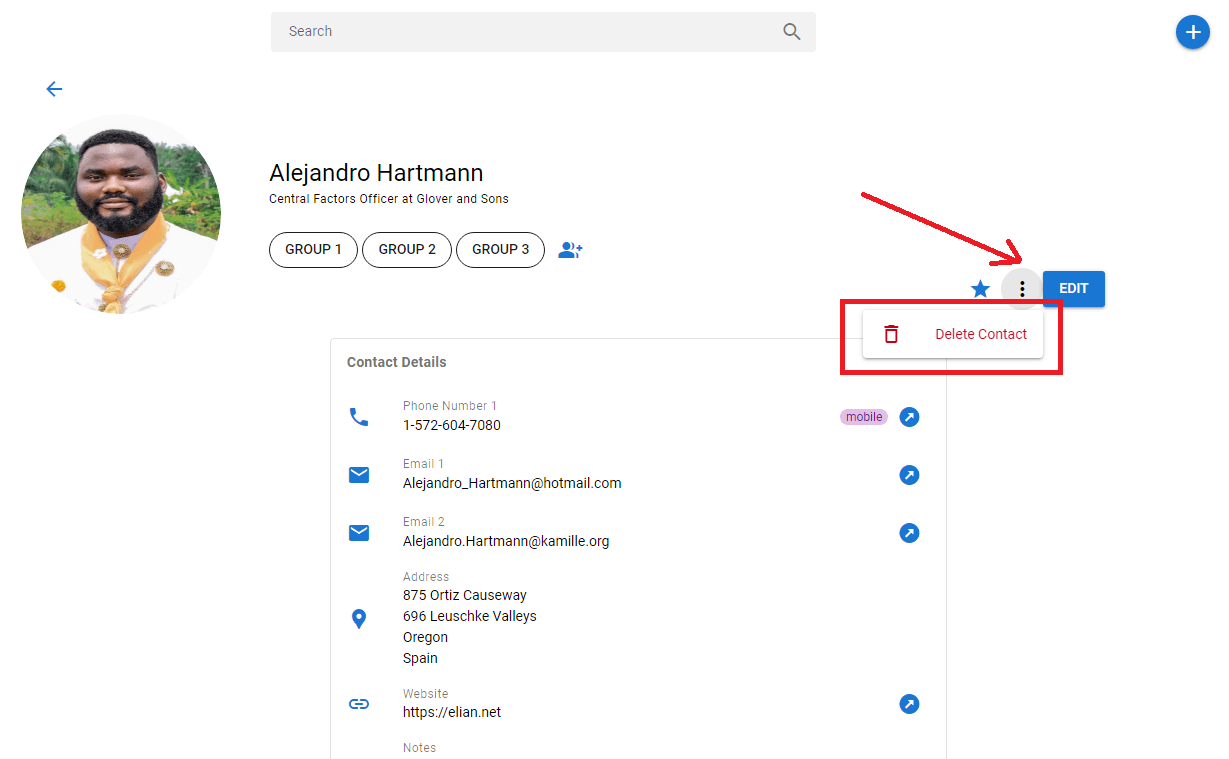
On the `Contacts` table (homepage), click a contact to open the `Contact View` page. Then click the menu button at the top-right side of the page. When you click the `Delete Contact` button on the menu, you will be asked to confirm the deletion. On confirmation, the contact will be deleted.
If you have followed this series to the point, congratulations!!
That is the end of the lesson and this series. Save all files and commit the changes.
```bash
git add .
git commit -m "feat: implement contact deletion"
git push origin 21-deleting-a-contact
git checkout master
git merge master 21-deleting-a-contact
git push origin master
```
*This document was generated from the live article page on https://ndianabasi.com/technical-blog/article/zdr4pxmgcax2dsfnwimhty0g/deleting-a-contact-with-adonis-js-and-vuejs • 2026-06-07*