
In this lesson, we will learn how to create sample (fake) data as we continue to develop and test our Google Contacts Clone app. We will make use of Model Factories and Seeders in the AdonisJS Framework for this.
Let’s start by creating a new branch for our repo:
# Make sure you are within your project
git checkout -b 16-seeding-and-listing-contacts
What are Model Factories and Seeders
A model factory is simply a function used to generate sample/fake model instances from a faker object before they are persisted to the database by a seeder. The faker object is a Faker.js object passed into the factory function by AdonisJS. You can make use of it or import your own Faker library into the Factory file. Read more about Model Factories.
A seeder is a class which must have a run() method as an entry point into the class. A seeder can be used to persist fake data generated from a factory or persist a real data from a data source such as JSON or JavaScript or API or CSV into your database. A seeder works like a controller. So you can import models into it and use the models to persist data from data source. If you want to use a factory, simple import the factory into the seeder file and then call the create or createMany static method to persist the data generated by the factory into the database.
We will learn how to use a model factory in this lesson
Creating a Model Factory
In AdonisJS, all model factories must be defined within the api/database/factories/index.ts file and then exported from that file so that seeders can consume them. If you need separation of concern, you can create standalone factory files but you must still import them into the api/database/factories/index.ts. Let’s look at how to achieve this for our API server.
-
Create a new file:
api/database/factories/ContactFactory.ts. If you are using VS Code do:
In the route of your project, do:
code api/database/factories/ContactFactory.ts
2. Open the newly-created `api/database/factories/ContactFactory.ts` file. Copy and paste the content of [this snapshot ](https://github.com/ndianabasi/google-contacts/blob/16-seeding-and-listing-contacts/api/database/factories/ContactFactory.ts) of the `ContactFactory.ts` file into the created file. Save the file.

3. Open `api/database/factories/index.ts`. Paste the lines below into the file. You can remove the comment on the first line. This imports the `ContactFactory` model factory into our Factory index file and export the `ContactFactory` as well so that seeders can easily consume the `ContactFactory`. Save the file.

```ts
import ContactFactory from './ContactFactory'

export { ContactFactory }
Let’s discuss what’s going within the api/database/factories/ContactFactory.ts file. Please refer to this snapshot for the line numbers. The content of the file is shown below for easy reference.
import Contact from 'App/Models/Contact'
import Factory from '@ioc:Adonis/Lucid/Factory'
import { DateTime } from 'luxon'

const ContactFactory = Factory.define(Contact, ({ faker }) => {
  const firstName = faker.name.firstName(faker.random.arrayElement([0, 1]))
  const surname = faker.name.lastName()
  const omitAddresses = faker.datatype.boolean()

  return {
    firstName,
    surname,
    company: faker.company.companyName(),
    jobTitle: (() => {
      const omit = faker.datatype.boolean()
      return omit ? null : faker.name.jobTitle()
    })(),
    email1: faker.internet.email(firstName, surname),
    email2: (() => {
      const omit = faker.datatype.boolean()
      return omit ? null : `${firstName}.${surname}@${faker.internet.domainName()}`
    })(),
    phoneNumber1: faker.phone.phoneNumber(),
    phoneNumber2: (() => {
      const omit = faker.datatype.boolean()
      return omit ? null : faker.phone.phoneNumber()
    })(),
    country: faker.address.country(),
    state: omitAddresses ? null : faker.address.state(),
    streetAddressLine1: omitAddresses ? null : faker.address.streetAddress(),
    streetAddressLine2: omitAddresses ? null : faker.address.streetAddress(),
    postCode: omitAddresses ? null : faker.address.zipCode(),
    birthday: (() => {
      const omit = faker.datatype.boolean()
      return omit ? null : DateTime.fromJSDate(faker.date.past())
    })(),
    website: (() => {
      const omit = faker.datatype.boolean()
      return omit ? null : `https://${faker.internet.domainName()}`
    })(),
    notes: (() => {
      const omit = faker.datatype.boolean()
      return omit ? null : faker.lorem.paragraphs(faker.random.arrayElement([1, 2]))
    })(),
  }
}).build()

export default ContactFactory-
At Lines 1-3, we make the necessary imports.
-
At Line 5, we call the
Factory.definefunction. Thedefinefunction takes two arguments. The first argument is the primary model we want to return from the factory. In this case, it is theContactmodel. The second argument is a callback function. The callback function is passed a context object and the context object contains thefakerinstance. We will use thefakerobject to create random data. Note that the properties of the object return at Line 10 must match the properties of theapi/app/Models/Contact.tsfile, else type errors will be thrown. -
At Line 6-7, we create and initialise the
firstNameandsurnameconstants. These are generated outside the object we are returning at Line 10 because we also need thefirstNameandsurnamefor generating theemail2property too. At Lines 11-12, we assign thefirstNameandsurnameconstants usingES6syntax.The function
faker.name.firstName()used to generate a random first name takes an argument which can be either0or1.0generates a male first name while1generates a female first name. So to achieve more randomness in the generation of the first names, we use the functionfaker.random.arrayElement(). ThearrayElement()function takes an array argument and returns a random element in the array. So,faker.random.arrayElement([0, 1])will return either0or1randomly. -
At Line 8, we create and initialise
omitAddressesconstant which will be used to randomly determine if address-related properties will be generated from Line 29 downwards. -
The
fakerfunctions are very easy to understand. However, you will notice that some properties have self-executing functions assigned to them. They include:jobTitle,email2,birthday,website, andnotesproperties.Self-executing functions are also known as
IIFEs (Immediately-Invoked Function Expressions). Let me explain why I usedIIFEs.Now, consider this line:
company: faker.company.companyName(),. For eachContactFactory.create()orContactFactory.createMany()call from the seeder, the factory will resolve all the properties defined within the object return at Line 10. When it gets to thecompanyproperty, it will call the value assigned to the property. Because the value is a function execution -faker.company.companyName()- a random company name will be generated and assigned to the company. It is function execution because of the()appended tocompanyName. If we do not append(), we will just be returning thecompanyNamefunction and not executing it.Now, imagine that we defined the
jobTitleproperty as just an arrow function as shown below:jobTitle: () => { const omit = faker.datatype.boolean() return omit ? null : faker.name.jobTitle() },
   When the `jobTitle` property is resolved, the assigned function will be returned. That is: `typeof jobTitle` will be equal to `function` not `string`. This is not what we want. So, to avoid this dangerous `beginner mistake`, we have to wrap and self-execute the function:

      ```ts
   // Step 1: wrap the function:
    jobTitle: (() => {
      const omit = faker.datatype.boolean()
      return omit ? null : faker.name.jobTitle()
    }),

   // Step 2: self-execute it by appending `()`
    jobTitle: (() => {
      const omit = faker.datatype.boolean()
      return omit ? null : faker.name.jobTitle()
    })(), // <-- See here
Now, when jobTitle is called, the function will self-execute and return the job title string that we want.
-
You will also notice this line (Line 15) within the IIFE:
const omit = faker.datatype.boolean().We use the line to generate local randomtrueandfalsevalues which determines if thejobTitleshould be generated or not. The same is observed in other properties with IIFEs. -
The logic of the other properties follow similar formats. Please study the code.
-
The
birthdayproperty needs special mention. For thebirthdayproperty, our intention is to return a LuxonDateTimeobject. This is very important. Remember that thebirthdayproperty in ourapi/app/Models/Contact.tsmodel file has the type:DateTime | null | undefined. So we can only return aDateTimeobject ornullorundefinedfrom the IIFE. Else, a type error will be thrown by TypeScript.Because of this, we start by calling
faker.date.past()to generate a random past date (that is, a date beforenow). Thefaker.date.past()function returns a native JavaScriptDateobject. Because we now have a native JavaScriptDateobject, we make use of Luxon’sDateTime.fromJSDate()function to convert the JavaScriptDateobject to a LuxonDateTimeobject by passing in theDateobject as the only argument in theDateTime.fromJSDate()function. Therefore:DateTime.fromJSDate(faker.date.past())returns a LuxonDateTimeobject in order to satisfy our type constraints. -
Lastly, after the
define()function, we chain thebuild()function to build/compile the factory.
Now, let’s consume our ContactFactory.
Creating the Contact seeder.
AdonisJS has a command for creating seeders. Run:
# Make sure you are in the `api` directory
node ace make:seeder Contact
# CREATE: database\seeders\Contact.ts
Now, open the api/database/seeders/Contact.ts file. Copy and paste the lines below into the file. Please refer this snapshot for this update.
import BaseSeeder from '@ioc:Adonis/Lucid/Seeder'
import { ContactFactory } from '../factories'

export default class ContactSeeder extends BaseSeeder {
  public async run() {
    await ContactFactory.createMany(100)
  }
}
Save the file. Let’s discuss what’s going on within the file.
-
At Line 1, we import the
BaseSeederfrom@ioc:Adonis/Lucid/Seederpackage. OurContactSeederclass will extend theBaseSeederand inherit its methods and properties. -
At Line 2, we import
ContactFactoryfromapi/database/factories/index.ts -
At Line 5, we define the
runmethod. Aseederclass which extends theBaseSeederclass must have arunmethod. Therunmethod is the entry point into aseeder. -
Within the
runmethod, we call and awaitContactFactory.createMany()static method. ThecreateMany()method takes an integer argument which is the number of records factory records we want to generate and persist to the database. In this case, we want to generate100random contacts from theContactFactoryand persist them to the database.
Running the Contact Seeder
To run the Contact seeder, do the following:
# Make sure that you are in the `api` directory. Do:
node ace db:seed -i
# completed database\seeders\Contact
This starts the db:seed command in interactive mode. It might take some time to start. When asked to Select files to run, press the space bar to select: database\seeders\Contact. Press Enter. This will generate and seed/persist 100 random contacts into the contacts table. You can generate more random contacts by re-run the Contact seeder as many times as you want.
Alternatively, you assign the file you want to seed with the --files flag. This can save you some time:
node ace db:seed --files database/seeders/Contact.tsOpen MySQL Workbench and inspect the contacts table. You will see a bunch of new contact rows.
Listing All Contacts with Pagination
Since we have a bunch of contacts in our contacts table, we can now list or fetch them. Now, if we have 10000 contacts, we do not want to fetch all 10000 contacts at once. The performance will be awful. So we have to use pagination to control how many contacts we want to fetch per call and the page to fetch. This is how we will be able to display the contacts on the frontend.
Let’s start.
-
Open the API route file:
api/start/routes.ts. Add this route definition to the file:
Route.get(‘/contacts’, ‘ContactsController.index’)
   Here we are defining a `GET` method on the path `/contacts`. The `index` method of the `ContactsController` file is defined as the route handler. Refer to [this snapshot](https://github.com/ndianabasi/google-contacts/blob/16-seeding-and-listing-contacts/api/start/routes.ts#L34).

2. Open `api/app/Controllers/Http/ContactsController.ts`. Refer to [this snapshot](https://github.com/ndianabasi/google-contacts/blob/16-seeding-and-listing-contacts/api/app/Controllers/Http/ContactsController.ts#L7-L24). Update the `index` method to:

   ```ts
  public async index({ request, response }: HttpContextContract) {
    try {
      const { page, perPage } = request.qs()

      const contacts = await Contact.query()
        .select(['id', 'first_name', 'surname', 'email1', 'phone_number1', 'company', 'job_title'])
        .paginate(page, perPage)

      return response.ok({ data: contacts })
    } catch (error) {
      Logger.error('Error at ContactsController.list:\n%o', error)

      return response.status(error?.status ?? 500).json({
        message: 'An error occurred while deleting the contact.',
        error: process.env.NODE_ENV !== 'production' ? error : null,
      })
    }
  }
Save the files. Let’s discuss what’s going on within the index method:
-
We destructure
pageandperPagefrom therequest.qs()method. Therequest.qs()parses thequeryportion of our API path and creates a record containing the query parameters and their corresponding values. Our path for paginating contacts will look like this:/contacts?perPage=50&page=1. A call torequest.qs()will return the object:
{ perPage: 50, page: 1 }
2. We make the query:

   ```ts
await Contact.query()
        .select(['id', 'first_name', 'surname', 'email1', 'phone_number1', 'company', 'job_title'])
        .paginate(page, perPage)
The query() method returns a query builder instance which we can apply query statements on. We need to call the select and paginate methods on the query builder instance. The select method accepts an array of columns we want to display from the contacts table. While the paginate method accepts two argument: page and perPag. The page argument indicates the current page we are fetching from paginated result while the perPage argument indicates the number of rows which should be return from the contacts table for each pagination call.
- We assign the result of the pagination to the
contactsconstant and then return thecontactsat Line 15.
Testing the Pagination with Postman
To conclude this lesson, we will use Postman to fetch paginated contacts results from our API server.
For the GET /contacts endpoint, do the following:
-
Right-click on the
CRUDcollection and clickAdd Request. EnterList Contactsas the name. -
Ensure that the request method is
GET. Enter/contacts?perPage=5&page=1in theRequest URLfield. You will notice that as your enter the query parameters and their values, the keys and values within theQuery Paramstable within theParamstab will automatically update. We want to fetch 5 rows at a time. Feel free to use any number you want for theperPageparameter. Save the request.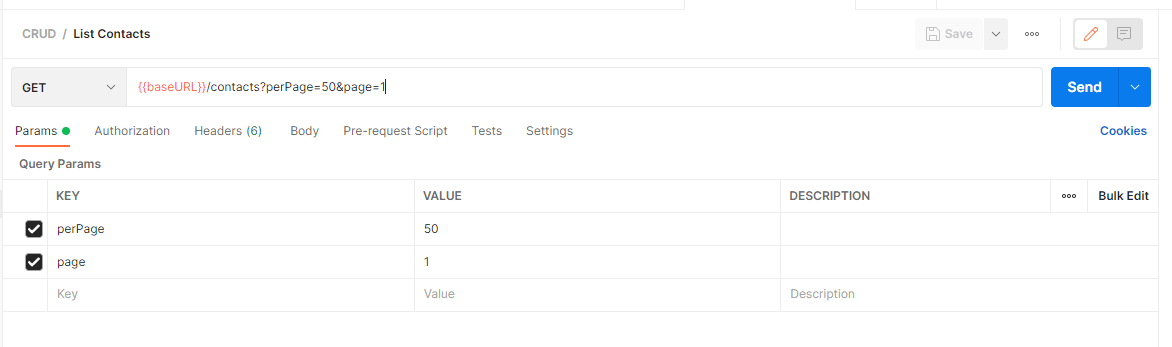
image.png -
Ensure that your API server is running. If it is not running, do the following:
Ensure that you are in the api directory. Then run:
yarn serve
4. Click the `Send` button to send the request.

5. Your result should be like this:

   ```json
{
    "data": {
        "meta": {
            "total": 211,
            "per_page": 5,
            "current_page": 1,
            "last_page": 43,
            "first_page": 1,
            "first_page_url": "/?page=1",
            "last_page_url": "/?page=43",
            "next_page_url": "/?page=2",
            "previous_page_url": null
        },
        "data": [
            {
                "id": "ckut8nv4a00003cvo9rg0bbgc",
                "first_name": "Hammad",
                "surname": "Pulham",
                "email1": "hpulham0@si.edu",
                "phone_number1": "+420 (767) 548-7576",
                "company": null,
                "job_title": null
            },
            {
                "id": "ckuxw4ivm000074vo5eyvcjn3",
                "first_name": "Zechariah",
                "surname": "Pollak",
                "email1": "zpollak1@blogtalkradio.com",
                "phone_number1": "+66 (700) 444-4282",
                "company": "Welch, Littel and Rowe",
                "job_title": "Account Executive"
            },
            {
                "id": "ckuyj7rb900010ovo5khu3gqt",
                "first_name": "George",
                "surname": "Schiller",
                "email1": "George72@yahoo.com",
                "phone_number1": "319.296.0522 x974",
                "company": "Moen LLC",
                "job_title": "Principal Implementation Architect"
            },
            {
                "id": "ckuyj7rbr00020ovobba6d3ja",
                "first_name": "Moses",
                "surname": "Hand",
                "email1": "Moses.Hand@gmail.com",
                "phone_number1": "(324) 307-7850",
                "company": "Lubowitz, Hirthe and Gorczany",
                "job_title": "Future Quality Specialist"
            },
            {
                "id": "ckuyj7rc600030ovo5nai1lhl",
                "first_name": "Maggie",
                "surname": "Nicolas",
                "email1": "Maggie.Nicolas31@gmail.com",
                "phone_number1": "1-285-526-9566 x68993",
                "company": "Goyette, Kerluke and Keebler",
                "job_title": "Legacy Assurance Technician"
            }
        ]
    }
}- Update the value of the
pageparameter to 2. And click theSendbutton. This fetches the 2nd page of the result.
This is how pagination is done in API servers. Congratulations.
This concludes this lesson. In the next lesson, we will return to the frontend and begin to connect it to the API server.
Save all your files, commit, merge with the master branch, and push to the remote repository (GitHub).
git add .
git commit -m "feat(api): complete seeding and listing of contacts"
git push origin 16-seeding-and-listing-contacts
git checkout master
git merge master 16-seeding-and-listing-contacts
git push origin master